

Use it in 30 seconds
Or by hand:
- Save the file below as
DESIGN.mdin your project root. Download DESIGN.md - Run
npx briefatto-board install. It adds the skill and a block to AGENTS.md and CLAUDE.md. - Ask your agent for UI. It reads
DESIGN.mdbefore visual work, andboard checktests what it renders.
npx briefatto-board install
npx briefatto-board checkColours (7)
Every colour below was read from the rendered pages of https://slack.com, 4 pages captured. The line under each shows where it was found.
- primary
rgb(115, 3, 148)slack.com/ at 1440×900 - background
rgb(255, 255, 255)slack.com/ at 1440×900 - surface
rgb(249, 240, 255)slack.com/ at 390×844 - foreground
rgb(0, 0, 0)slack.com/ at 1440×900 - muted
rgb(94, 93, 96)slack.com/ at 390×844 - border
rgb(237, 234, 237)slack.com/ at 1440×900 - on-primary
rgb(255, 255, 255)slack.com/ at 1440×900
Contrast
- foreground on background
21.00:1AAA - muted on background
6.54:1AA - on-primary on primary
9.68:1AAA
Type, radii and spacing
Type
- displayThe quick brown fox jumps over the lazy dogSalesforce-Avant-Garde · 64px / 1.06 · 700 · -0.012em · fallback shown
- headingThe quick brown fox jumps over the lazy dogSalesforce-Avant-Garde · 32px / 1.25 · 700 · -0.012em · fallback shown
- bodyThe quick brown fox jumps over the lazy dogSalesforce-Sans · 16px / 1.56 · 400 · -0.001em · fallback shown
- actionThe quick brown fox jumps over the lazy dogSalesforce-Sans · 14px / 1.2 · 700 · 0.057em · fallback shown
Corner radii
4pxcontrolslack.com/ at 1440×9000pxcardslack.com/ at 1440×900
Spacing
4pxxs8pxsm16pxmd24pxlg32pxxl64pxsection
A card made from this file
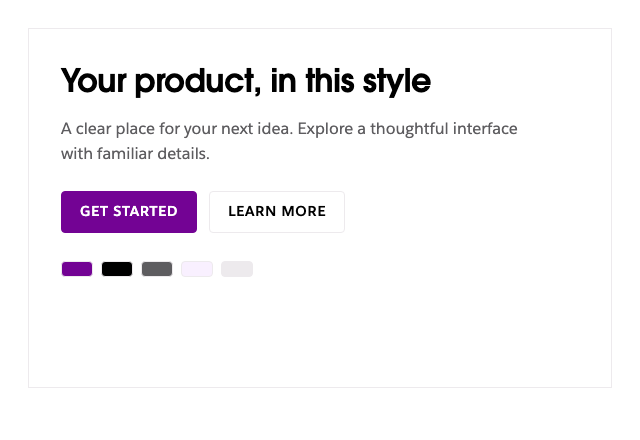
The full DESIGN.md
Download DESIGN.md182 lines of Markdown
---
version: alpha
name: "Slack"
description: "Slack's colours, type, radii, spacing and components as DESIGN.md tokens. Not affiliated with Slack."
colors:
  primary: "rgb(115, 3, 148)"
  background: "rgb(255, 255, 255)"
  surface: "rgb(249, 240, 255)"
  foreground: "rgb(0, 0, 0)"
  muted: "rgb(94, 93, 96)"
  border: "rgb(237, 234, 237)"
  on-primary: "rgb(255, 255, 255)"
typography:
  display:
    fontFamily: 'Salesforce-Avant-Garde, system-ui, -apple-system, blinkmacsystemfont, "Segoe UI", roboto, "Helvetica Neue", arial, "Noto Sans", sans-serif, "Apple Color Emoji", "Segoe UI Emoji", "Segoe UI Symbol", "Noto Color Emoji"'
    fontSize: 64px
    fontWeight: 700
    lineHeight: 1.06
    letterSpacing: -0.012em
  display-mobile:
    fontFamily: 'Salesforce-Avant-Garde, system-ui, -apple-system, blinkmacsystemfont, "Segoe UI", roboto, "Helvetica Neue", arial, "Noto Sans", sans-serif, "Apple Color Emoji", "Segoe UI Emoji", "Segoe UI Symbol", "Noto Color Emoji"'
    fontSize: 32px
    fontWeight: 700
    lineHeight: 1.12
    letterSpacing: -0.012em
  heading:
    fontFamily: 'Salesforce-Avant-Garde, system-ui, -apple-system, blinkmacsystemfont, "Segoe UI", roboto, "Helvetica Neue", arial, "Noto Sans", sans-serif, "Apple Color Emoji", "Segoe UI Emoji", "Segoe UI Symbol", "Noto Color Emoji"'
    fontSize: 32px
    fontWeight: 700
    lineHeight: 1.25
    letterSpacing: -0.012em
  body:
    fontFamily: 'Salesforce-Sans, system-ui, -apple-system, blinkmacsystemfont, "Segoe UI", roboto, "Helvetica Neue", arial, "Noto Sans", sans-serif, "Apple Color Emoji", "Segoe UI Emoji", "Segoe UI Symbol", "Noto Color Emoji"'
    fontSize: 16px
    fontWeight: 400
    lineHeight: 1.56
    letterSpacing: -0.001em
  action:
    fontFamily: 'Salesforce-Sans, system-ui, -apple-system, blinkmacsystemfont, "Segoe UI", roboto, "Helvetica Neue", arial, "Noto Sans", sans-serif, "Apple Color Emoji", "Segoe UI Emoji", "Segoe UI Symbol", "Noto Color Emoji"'
    fontSize: 14px
    fontWeight: 700
    lineHeight: 1.2
    letterSpacing: 0.057em
rounded:
  control: 4px
  card: 0px
spacing:
  xs: 4px
  sm: 8px
  md: 16px
  lg: 24px
  xl: 32px
  section: 64px
components:
  primary-button:
    backgroundColor: "{colors.primary}"
    textColor: "{colors.on-primary}"
    rounded: "{rounded.control}"
  card:
    backgroundColor: "{colors.surface}"
    textColor: "{colors.foreground}"
    rounded: "{rounded.card}"
    padding: "{spacing.lg}"
    typography: "{typography.body}"
  caption:
    textColor: "{colors.muted}"
  separator:
    backgroundColor: "{colors.border}"
---

# Slack DESIGN.md

## Overview

Bold geometric Salesforce Avant Garde headings and simple Salesforce Sans interface text give a crisp collaborative system, punctuated by saturated purple and pale lavender.

Built from [/](https://slack.com/) and [/pricing](https://slack.com/pricing), captured on 2026-11-21 UTC at 1440×900 and 390×844. The front matter holds the computed values as portable tokens.

## Colors

| Token | Computed value | Role |
| --- | --- | --- |
| primary | `rgb(115, 3, 148)` | Priority actions and selected emphasis |
| background | `rgb(255, 255, 255)` | Page canvas |
| surface | `rgb(249, 240, 255)` | Panels and cards |
| foreground | `rgb(0, 0, 0)` | Primary text |
| muted | `rgb(94, 93, 96)` | Supporting text |
| border | `rgb(237, 234, 237)` | Quiet separators and outlines |
| on-primary | `rgb(255, 255, 255)` | Text on the primary action |


Keep the page ground and text pairing stable. Give the primary color a clear job in actions, selection, or links; use surface changes and thin rules to organize secondary content. Alpha colors retain the captured opacity and must be composited over the intended background.

## Typography

| Role | First family | Size | Weight | Leading | Tracking |
| --- | --- | --- | --- | --- | --- |
| display | Salesforce-Avant-Garde | 64px | 700 | 1.06 | -0.012em |
| display-mobile | Salesforce-Avant-Garde | 32px | 700 | 1.12 | -0.012em |
| heading | Salesforce-Avant-Garde | 32px | 700 | 1.25 | -0.012em |
| body | Salesforce-Sans | 16px | 400 | 1.56 | -0.001em |
| action | Salesforce-Sans | 14px | 700 | 1.2 | 0.057em |

Keep display, reading, and action roles distinct. The heading sample is the recurring section role, while display records the first prominent headline. Use the mobile display value at narrow widths; allow natural line wrapping and preserve the reading measure. The display transformation is `none` and its font style is `normal`; preserve these in CSS.

Font loading:

```css
@font-face { font-display: swap; font-family: Salesforce-Avant-Garde; font-style: normal; font-weight: 700; src: local("☺"), url("https://a.slack-edge.com/bv1-13-br/avant-garde-181346a5874daa50.woff2") format("woff2"), url("https://a.slack-edge.com/bv1-13-br/avant-garde-15c0df5e5ca7de9a.woff") format("woff"); unicode-range: U+0-F8FE, U+F900-FFFF; }
@font-face { font-display: swap; font-family: Salesforce-Sans; font-style: normal; font-weight: 100; src: local("☺"), url("https://a.slack-edge.com/bv1-13-br/salesforce-sans-thin-7c1ec0ce30b8c2cf.woff2") format("woff2"), url("https://a.slack-edge.com/bv1-13-br/salesforce-sans-thin-4ecfae7f40cc9d02.woff") format("woff"); unicode-range: U+0-F8FE, U+F900-FFFF; }
@font-face { font-display: swap; font-family: Salesforce-Sans; font-style: italic; font-weight: 400; src: local("☺"), url("https://a.slack-edge.com/bv1-13-br/salesforce-sans-italic-4d0e140befc2310a.woff2") format("woff2"), url("https://a.slack-edge.com/bv1-13-br/salesforce-sans-italic-ecbc73071b65f7d9.woff") format("woff"); unicode-range: U+0-F8FE, U+F900-FFFF; }
@font-face { font-display: swap; font-family: Salesforce-Sans; font-style: italic; font-weight: 100; src: local("☺"), url("https://a.slack-edge.com/bv1-13-br/salesforce-sans-thin-italic-7b27f87866317b5e.woff2") format("woff2"), url("https://a.slack-edge.com/bv1-13-br/salesforce-sans-thin-italic-79209f91c45d78fa.woff") format("woff"); unicode-range: U+0-F8FE, U+F900-FFFF; }
@font-face { font-display: swap; font-family: Salesforce-Sans; font-style: normal; font-weight: 400; src: local("☺"), url("https://a.slack-edge.com/bv1-13-br/salesforce-sans-regular-8bfcbbd54976174c.woff2") format("woff2"), url("https://a.slack-edge.com/bv1-13-br/salesforce-sans-regular-b6be745368c0e260.woff") format("woff"); unicode-range: U+0-F8FE, U+F900-FFFF; }
@font-face { font-display: swap; font-family: Salesforce-Sans; font-style: italic; font-weight: 200; src: local("☺"), url("https://a.slack-edge.com/bv1-13-br/salesforce-sans-light-italic-6e48ca13a5de1047.woff2") format("woff2"), url("https://a.slack-edge.com/bv1-13-br/salesforce-sans-light-italic-d2762765e5dfbb78.woff") format("woff"); unicode-range: U+0-F8FE, U+F900-FFFF; }
@font-face { font-display: swap; font-family: Salesforce-Sans; font-style: normal; font-weight: 200; src: local("☺"), url("https://a.slack-edge.com/bv1-13-br/salesforce-sans-light-9a42f3f2982b6900.woff2") format("woff2"), url("https://a.slack-edge.com/bv1-13-br/salesforce-sans-light-c11ba48e4da6901b.woff") format("woff"); unicode-range: U+0-F8FE, U+F900-FFFF; }
@font-face { font-display: swap; font-family: Salesforce-Sans; font-style: normal; font-weight: 700; src: local("☺"), url("https://a.slack-edge.com/bv1-13-br/salesforce-sans-bold-1385939fead426e2.woff2") format("woff2"), url("https://a.slack-edge.com/bv1-13-br/salesforce-sans-bold-7399a2850da4decc.woff") format("woff"); unicode-range: U+0-F8FE, U+F900-FFFF; }
@font-face { font-display: swap; font-family: Salesforce-Sans; font-style: italic; font-weight: 700; src: local("☺"), url("https://a.slack-edge.com/bv1-13-br/salesforce-sans-bold-italic-e69f544d97e0890d.woff2") format("woff2"), url("https://a.slack-edge.com/bv1-13-br/salesforce-sans-bold-italic-83e4323463f1bd8b.woff") format("woff"); unicode-range: U+0-F8FE, U+F900-FFFF; }
@font-face { font-display: swap; font-family: Salesforce-Sans; font-style: normal; font-weight: 600; src: local("☺"), url("https://a.slack-edge.com/bv1-13-br/salesforce-sans-semi-bold-32ef2933d5cf7e38.woff2") format("woff2"), url("https://a.slack-edge.com/bv1-13-br/salesforce-sans-semi-bold-84163b51e0b404a7.woff") format("woff"); unicode-range: U+0-F8FE, U+F900-FFFF; }
@font-face { font-display: swap; font-family: Salesforce-Sans; font-style: normal; font-weight: 300; src: local("☺"), url("https://a.slack-edge.com/bv1-13-br/salesforce-sans-book-d4b6246e65ff691a.woff2") format("woff2"), url("https://a.slack-edge.com/bv1-13-br/salesforce-sans-book-8a7281f8631e2d8e.woff") format("woff"); unicode-range: U+0-F8FE, U+F900-FFFF; }
@font-face{font-display:swap;font-family:Salesforce-Avant-Garde;font-style:normal;font-weight:700;src:local(☺),url("https://a.slack-edge.com/bv1-13-br/avant-garde-181346a5874daa50.woff2")format("woff2"),url("https://a.slack-edge.com/bv1-13-br/avant-garde-15c0df5e5ca7de9a.woff")format("woff");unicode-range:U+0-F8FE,U+F900-FFFF}
@font-face{font-display:swap;font-family:Salesforce-Sans;font-style:normal;font-weight:100;src:local(☺),url("https://a.slack-edge.com/bv1-13-br/salesforce-sans-thin-7c1ec0ce30b8c2cf.woff2")format("woff2"),url("https://a.slack-edge.com/bv1-13-br/salesforce-sans-thin-4ecfae7f40cc9d02.woff")format("woff");unicode-range:U+0-F8FE,U+F900-FFFF}
@font-face{font-display:swap;font-family:Salesforce-Sans;font-style:italic;font-weight:400;src:local(☺),url("https://a.slack-edge.com/bv1-13-br/salesforce-sans-italic-4d0e140befc2310a.woff2")format("woff2"),url("https://a.slack-edge.com/bv1-13-br/salesforce-sans-italic-ecbc73071b65f7d9.woff")format("woff");unicode-range:U+0-F8FE,U+F900-FFFF}
@font-face{font-display:swap;font-family:Salesforce-Sans;font-style:italic;font-weight:100;src:local(☺),url("https://a.slack-edge.com/bv1-13-br/salesforce-sans-thin-italic-7b27f87866317b5e.woff2")format("woff2"),url("https://a.slack-edge.com/bv1-13-br/salesforce-sans-thin-italic-79209f91c45d78fa.woff")format("woff");unicode-range:U+0-F8FE,U+F900-FFFF}
@font-face{font-display:swap;font-family:Salesforce-Sans;font-style:normal;font-weight:400;src:local(☺),url("https://a.slack-edge.com/bv1-13-br/salesforce-sans-regular-8bfcbbd54976174c.woff2")format("woff2"),url("https://a.slack-edge.com/bv1-13-br/salesforce-sans-regular-b6be745368c0e260.woff")format("woff");unicode-range:U+0-F8FE,U+F900-FFFF}
@font-face{font-display:swap;font-family:Salesforce-Sans;font-style:italic;font-weight:200;src:local(☺),url("https://a.slack-edge.com/bv1-13-br/salesforce-sans-light-italic-6e48ca13a5de1047.woff2")format("woff2"),url("https://a.slack-edge.com/bv1-13-br/salesforce-sans-light-italic-d2762765e5dfbb78.woff")format("woff");unicode-range:U+0-F8FE,U+F900-FFFF}
@font-face{font-display:swap;font-family:Salesforce-Sans;font-style:normal;font-weight:200;src:local(☺),url("https://a.slack-edge.com/bv1-13-br/salesforce-sans-light-9a42f3f2982b6900.woff2")format("woff2"),url("https://a.slack-edge.com/bv1-13-br/salesforce-sans-light-c11ba48e4da6901b.woff")format("woff");unicode-range:U+0-F8FE,U+F900-FFFF}
@font-face{font-display:swap;font-family:Salesforce-Sans;font-style:normal;font-weight:700;src:local(☺),url("https://a.slack-edge.com/bv1-13-br/salesforce-sans-bold-1385939fead426e2.woff2")format("woff2"),url("https://a.slack-edge.com/bv1-13-br/salesforce-sans-bold-7399a2850da4decc.woff")format("woff");unicode-range:U+0-F8FE,U+F900-FFFF}
@font-face{font-display:swap;font-family:Salesforce-Sans;font-style:italic;font-weight:700;src:local(☺),url("https://a.slack-edge.com/bv1-13-br/salesforce-sans-bold-italic-e69f544d97e0890d.woff2")format("woff2"),url("https://a.slack-edge.com/bv1-13-br/salesforce-sans-bold-italic-83e4323463f1bd8b.woff")format("woff");unicode-range:U+0-F8FE,U+F900-FFFF}
@font-face{font-display:swap;font-family:Salesforce-Sans;font-style:normal;font-weight:600;src:local(☺),url("https://a.slack-edge.com/bv1-13-br/salesforce-sans-semi-bold-32ef2933d5cf7e38.woff2")format("woff2"),url("https://a.slack-edge.com/bv1-13-br/salesforce-sans-semi-bold-84163b51e0b404a7.woff")format("woff");unicode-range:U+0-F8FE,U+F900-FFFF}
@font-face{font-display:swap;font-family:Salesforce-Sans;font-style:normal;font-weight:300;src:local(☺),url("https://a.slack-edge.com/bv1-13-br/salesforce-sans-book-d4b6246e65ff691a.woff2")format("woff2"),url("https://a.slack-edge.com/bv1-13-br/salesforce-sans-book-8a7281f8631e2d8e.woff")format("woff");unicode-range:U+0-F8FE,U+F900-FFFF}
```

The full fallback stacks are in the front matter.

## Layout

Center the main statement above compact action pairs and a large application demonstration. Alternate white reading sections with deep purple bands and curved lavender ground shapes. Pricing uses a continuous ruled comparison grid with a raised featured column; mobile stacks plans.

Spacing scale: xs 4px, sm 8px, md 16px, lg 24px, xl 32px, section 64px. Use smaller steps within a control and larger steps between content groups.

The sampled header is static, 110.547px high, with 0px left and 0px right padding. The sampled header is static, 163.75px high, with 24px left and 24px right padding.

Measured desktop grid tracks: `285px 285.016px 285.016px 285.016px` with gap `16px 2.43902%`. Build them as a fluid grid. Sampled container maximum widths: `100%`, `75%`, `801px`.

At narrow widths, keep the content order, let columns stack, wrap action groups, and give navigation a compact treatment. Recreate the observed desktop and mobile differences, with breakpoints chosen for your layout.

## Elevation & Depth

The sampled card shadow is `none`. Keep most reading surfaces quiet. Use borders and surface contrast for grouping; reserve stronger depth for floating controls or intentional feature panels.

## Shapes

Controls use `4px`; the reusable card treatment uses `0px`. Keep corner geometry consistent within each component family. Do not automatically apply the card radius to every image, badge, or full-width section.

## Components

Use compact uppercase action labels, 4px control corners, purple filled and outlined treatments, checkmarked feature rows and thin pale separators. Featured plans carry a purple border and a rounded top value banner.

- **Primary and secondary actions:** use primary/on-primary for the priority action and a surface/foreground or outlined treatment for the supporting action. The sampled action has height 39px, horizontal padding 40px / 40px, and gap normal. Keep labels short and allow enough hit area for touch.
- **Cards:** group one heading, supporting text, and a clear next step. Preserve the hierarchy and spacing; avoid making every element a nested card.
- **Navigation:** retain the captured information hierarchy and distinguish navigation links from the main call to action. Provide a visible keyboard focus treatment.
- **Forms:** build fields from the action typography, control radius, and separator color. Add persistent labels, useful errors, and clear disabled/focus states.

**Imagery and iconography.** Large Slack interface demonstrations, customer logo rows and occasional people photography support the content; avoid turning decorative product screenshots into functional controls.

**Motion.** Observed CSS transition declarations include `background-color, box-shadow 0.26s, 0.26s`, `box-shadow, color, background 0.42s, 0.42s, 0.42s`, `transform 0.2s`, `transform 0.42s`. Use restrained feedback and respect reduced-motion preferences.

**Voice.** Energetic, direct and team-oriented, with compact labels and confident statements.

## Do's and Don'ts

- Do preserve the palette roles, type hierarchy, and relationship between dense controls and larger section spacing.
- Do keep content readable at both captured widths and provide focus, error, loading, and reduced-motion behavior for any new interface.
- Do use simple geometric placeholders for imagery.
- Don't reproduce the logo, brand illustrations, product screenshots, or marketing text.
- Don't replace the defining spacing and type proportions with unrelated decorative effects.

---

Made with [Briefatto Board](https://github.com/Briefatto/briefatto-board). Run `npx briefatto-board install` and your coding agent reads this file before visual work and checks every piece it renders.
Questions and answers
What is the Slack DESIGN.md?
A style file extracted from the public website of Slack (https://slack.com), free to use for your own product.
How do I use it with Claude Code / Cursor?
Save the file as DESIGN.md in your project root and run npx briefatto-board install. That adds a block to AGENTS.md and CLAUDE.md, which Claude Code, Codex, Cursor, Copilot, Gemini CLI and other agents read, telling the agent to read DESIGN.md before any visual work. Run board check on what it renders.
Can I change it to my own brand?
Yes. It is a plain Markdown file: replace the colours, fonts, radii and spacing with your own, or run npx briefatto-board adopt . on your own site and let the agent write yours. Then freeze it with npx briefatto-board freeze . so every session uses the same version.
Where do the values in the Slack file come from?
Each colour, font, radius and spacing value was read from the rendered pages of https://slack.com (4 pages captured) on 2026-11-21, and the evidence for each is listed on this page.